👁 Phase 2 — Encounter
🎧 Audio / Visual
⏱ 8 minutes
Task 2 — How the Eye Detects Colour
First contact with the core science — through beauty and strangeness, not through a textbook definition. Three visual concepts, the Dress Illusion, and an AI pair task.
Animated slide content — 3 slides
The Dress Illusion — Live Vote
👗 What colour is this dress?
Look carefully at the image and vote. There is no wrong answer — the science is in the disagreement!
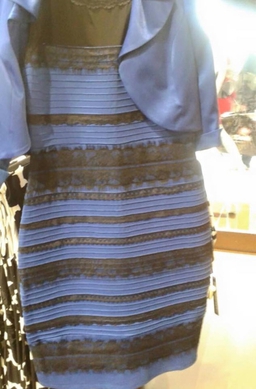
What colour do YOU see this dress?
🔬 The science reveals: The dress is actually blue and black. The reason people see it differently is because the brain makes assumptions about the surrounding light. If your brain thinks the light is cool/blue, it subtracts that and you see gold/white. If it assumes warm/yellow light, you see blue/black. This is colour perception in action!
AI Pair Task — Wonder & Share
🤖 Wonder Learning AI
With your partner, read the AI response below. Highlight the one sentence that surprised you most, then share it to the class board.
Pre-loaded prompt
"Explain to a 12-year-old how the eye sees colour. Make it surprising and beautiful."
Bridge to Task 3
"Now let us check what you have understood. Two quick questions — no grades, just honest thinking."
What happens in Task 2
Students watch 3 animated slides about light, the retina, and the brain. Then they vote on the Dress Illusion (live bar chart). After voting, an AI pair task opens — students read an AI explanation, choose one surprising sentence, and post it to the shared class board. The task ends with a 2-question formative quiz (Task 3).
♿ SEN Adaptations
- Audio narration button on all slides (top right of each slide)
- Tappable key terms include audio pronunciation
- Simplified content mode for junior students
- Poll buttons use large text with colour fill icons
- Padlet note input accepts voice recording
🖨️ No-Tech Format
- Teacher presents 3 key facts verbally with whiteboard drawings
- Printed Dress Illusion card distributed to each pair
- Show of hands for the vote — teacher records on whiteboard
- Students write their "one surprising sentence" on a worksheet